ProjectKaren.Ai is a foundation of Python code that enables hardware interactions leveraging Machine Learning to create Artificial Intelligence. Wow, that’s a mouthful. Let’s try again, Karen is a set of Python classes and functions that you can use to build your own personal assistant similar to Apple’s Siri, Google’s Assistant, or Amazon’s Alexa. There are libraries for speech recognition, speech synthesis, face and object detection, and even face recognition. So basically Karen can see you, hear you, and respond to you.
Karen is 100% customizable. Its modular design allows you to create your own skills or integrate new hardware to fit your specific needs. The code is open source and shared with a business-friendly license.
How does it work?
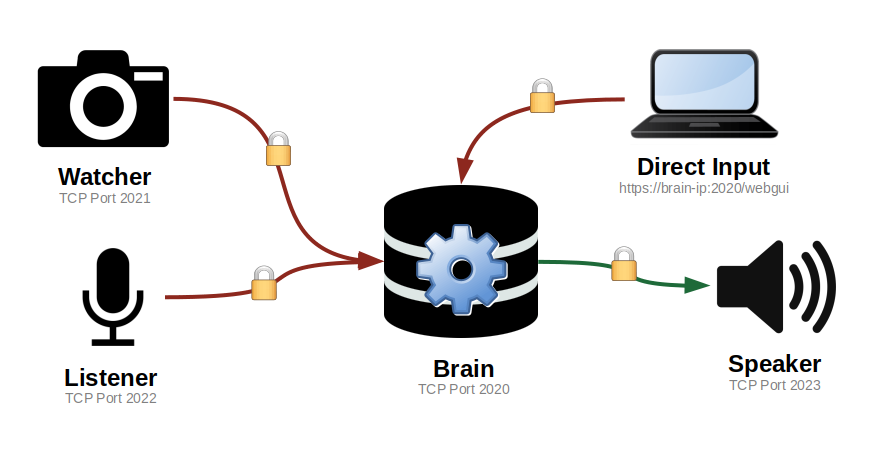
Karen leverages a modular design that separates its primary functions into isolated processes. The individual modules use machine learning models to parse inputs into commands which are sent back to the Brain for processing. Each module interfaces with the brain via TCP/IP sockets which can run via a variety of methods including the default standalone configuration which is an isolated/secure design.
Expansion through Modular Design
Karen’s primary functions are separated into modules which can be mixed, matched, and recombined through the use of device containers. A device container can include any number or combination of modules so long as the hardware is available. This separation of the physical layer and the communication layer enables the addition of multiple inputs or outputs to a virtually unlimited number of devices.
Hardware Requirements
Karen is designed to be lightweight and can therefore be run on virtually any hardware. At present, Karen is designed to run on a single Raspberry Pi device as these are inexpensive and readily available. The Raspberry Pi itself is also designed for “Makers” which fits well with the ideologies behind ProjectKaren.Ai.
Installation Instructions
The quick intro for installing Karen on the Raspberry Pi are below. If you need more information then check out the Documentation.
sudo apt-get update
sudo apt-get upgrade
sudo apt-get dist-upgrade

sudo apt-get install \
  libfann2 \
  python3-fann2 \
  python3-pyaudio \
  python3-pyqt5 \
  python3-dev \
  festival \
  festvox-us-slt-hts  \
  libportaudio2 \
  libasound2-dev \
  libatlas-base-dev \
  cmake

pip3 install scikit-build
pip3 install opencv-python-contrib

pip3 install karen-brain \
  karen-device \
  karen-plugin-listener \
  karen-plugin-watcher \
  karen-plugin-speaker \
  karen-plugin-panel

python3 -m karen.run